Showing posts with label Iphone Unlock. Show all posts

Wednesday, 18 July 2012

Phone Tools v1.1-[A Free iPhone Software Tool/Pc


Features:
  1. Carrier Checker
  2. Bulk Carrier Check
  3. IMEI Validation Offline
  4. IMEI Validation Online
  5. Apple Support And Service Checker
  6. Serial Checker
  7. iPhone Factory Unlocking Service
  8. Some Other Tools

Change Log:
V:1.1
-Registration in a easy way(Standalone/Free)
-Some bugs fixed
 
 
 Download

.Net Framework 4

Note: Net Framework 4 Is Required. Otherwise Software May Gives Error To Run.

Wednesday, 11 July 2012

Unlock 3G & 3GS BASEBAND 06.15.00 WITHOUT WIFI >>(GUIDE)

Unlock 3G & 3GS BASEBAND 06.15.00 WITHOUT WIFI...(GUIDE)

HI GUYS FOLLOW THIS INSTRUCTION....

1. download iphone folder from here

a:Click This Link

b: unlock without WIFI.zip

2. now go through explorer and create a folder named ""AutoInstall"" in your iphone..

"iPhone\private\var\root\Media\Cydia\

and put these 2 files in your "AutoInstall"

3. now restart 2 times....

done.....

iPhone Unlocking Guide For New

Here's All iphone Versions and how to Unlock it and Which is unlockable and which Not , So I Won't See Any More Useless Lazy Threads About Can i unlock that and how


ANY NEW THREAD ASKING ABOUT UNLOCKING WILL BE DELETED


iPhone 3G And 3GS

Unlockable Basebands : 5.11 , 5.12 , 5.13 , 6.15
If You have one of This Basebands just jailbreak Then install Ultrasn0w From Cydia

Any Questions Ask here


If You Don't have one of Those Basebands
You Can Upgrade Baseband Using Redsn0w To iPad Base band 6.15 But You Will Lose GPS .
here's How

iClarified - iPhone - How to Jailbreak and Unlock Your iPhone 3G Using RedSn0w (Windows) [4.2.1] (Comments)
If You Already have 6.15 Baseband and You need to Downgrade it

here's How
Guide Downgrade iPhone3GS 6.15 Baseband Using Redsn0w
IMPORTANT NOTE FOR 3GS :
Use Latest Redsn0w Version and Check here before updating baseband
[Warning] iPhone 3Gs New Baseband Flash Chip [INFO]
iPhone 4

The Only Unlockable Modem is 1.59 with ultrasn0w

All others Except 4.11 and 4.12 Can Be Unlocked using Gevey or Any Other Sim

check here

SIM Solution Products - GSM-Forum

SO AGAIN 4.11 and 4.12 CAN'T BE UNLOCKED Only With Factory Unlock Services You Can Ask About Prices and Services here
Wanted Products - GSM-Forum

ANY THREAD ASKING ABOUT PRICE OR Factory Unlocking Service Will be Moved 
iPhone 4s

There's No Free Solution For 4s Released Till now
Only Factory Unlocking Or Gevey or Xsim or Any Others


SIM Solution Products - GSM-Forum
Wanted Products - GSM-Forum


Please Don't Post Asking About Unlocking iPhone Again
Use Search If You Can't Find What You Need Post and We Will be Happy To Help


This Thread Will be Updated


Sunday, 1 July 2012

Iphone 4, 5.1.1_9b206_restore.ipsw jailbreak solution


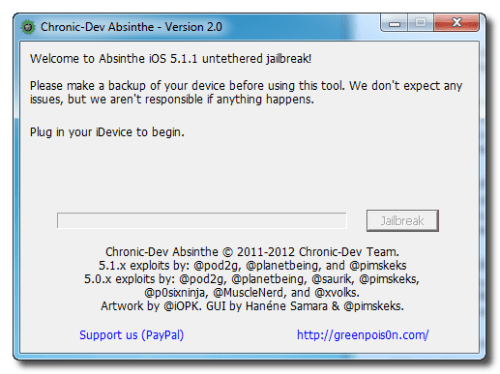
These are instructions on how to perform an untethered jailbreak of your iPhone on iOS 5.1.1 using Absinthe for Windows.

Warning***: Before you continue make sure to do a backup of your device in iTunes as you may lose your Camera Roll during this process.

These are instructions on how to perform an untethered jailbreak of your iPhone on iOS 5.1.1 using Absinthe for Windows.

Warning***: Before you continue make sure to do a backup of your device in iTunes as you may lose your Camera Roll during this process.


Step One
Download the latest version of Absinthe from Download

Step Two
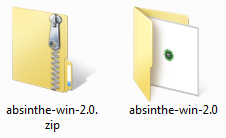
Extract the downloaded archive.

  \


Step Three
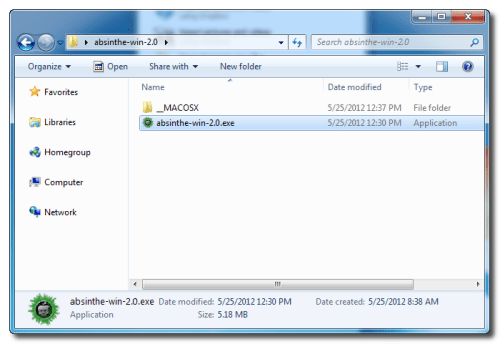
Double click the absinthe-win-2.0.exe file from the folder that was just extracted. 


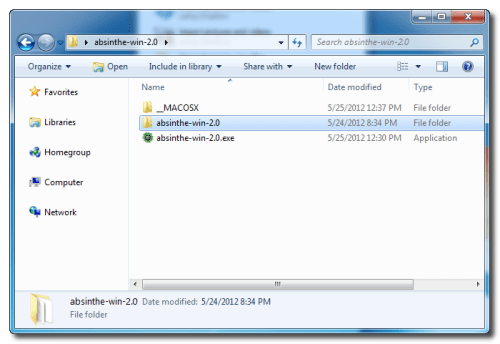
This will create a new folder called absinthe-win-2.0. 


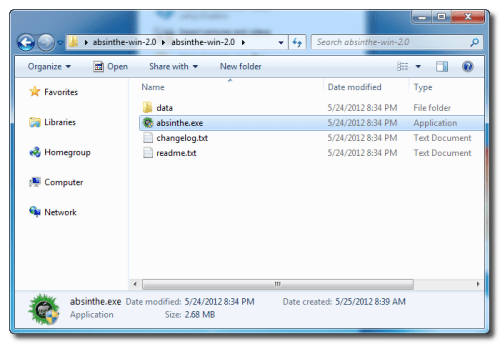
Open the newly created folder and launch absinthe.exe.


Step Three
As prompted, connect your iPhone to the computer via USB. Make sure to remove any passcodes or VPN settings you've previously set.


Step Four
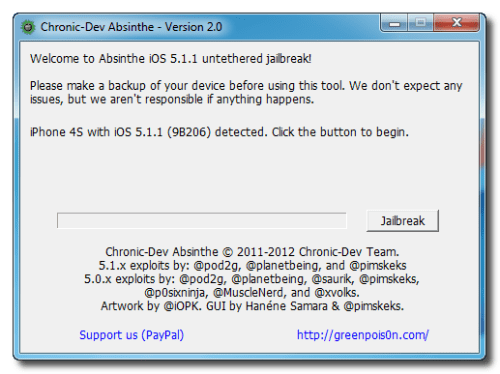
Click the Jailbreak button to begin


Step Five
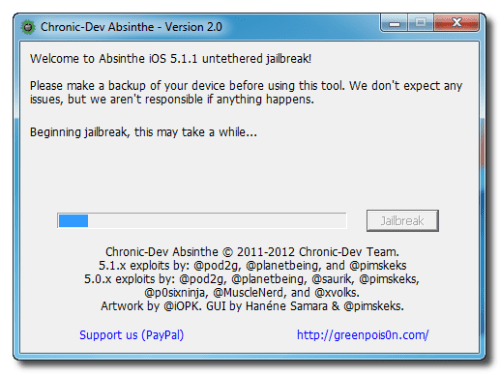
The application will take you through several steps to jailbreak including: beginning jailbreak, sending initial jailbreak data, sending final jailbreak data, waiting for reboot, and waiting for process to complete.


Step Six
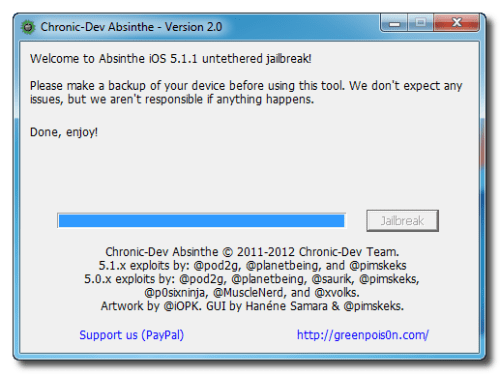
You will be informed that the jailbreak is 'Done'. 


Step Seven
In a few moments you will notice Cydia appear on your Springboard!


***If you have any problems please retry the procedure on a device cleanly restored to iOS 5.1.1 (Remember to backup before restoring)***

Iphone multi-imeis checker

Iphone Iphone Carrier Checker free download

This version have direct connection with apple site so no problem if 3rd party site is offline
Download 

Saturday, 30 June 2012

Unlock your Iphone 10 minutes!For full Free!Free!Free!


Unlocking your 4g iPhone

2) Download required files:

We have packaged all the necessary required files together, the update to version 3.0 is quite large (240MB), therefore, depending on your connection speed, this may take a little time to complete. Please save the folder to your desktop so it can be easily located when required.

Download:
Download the unlock software from the link below and save it to your desktop so it can be easily located.
                                                                Download redsn0w
When the download has finished, open the zip file. Check the contents of the folder 'UnlockUriPhoneNow', it will contain the following 4 items:

Redsn0w.exe
iPhone1,1_3.0_7A341_Restore.ipsw
BL-39.bin
BL-46.bin 
Unlocking your 4g iPhone (Windows)
Restore your iPhone to latest software 3.0:
Already running version 3.0:
We suggest you restore your phone to version 3.0 with the .ipsw file supplied to guarantee a 'problem free' unlock.

1) Connect your iPhone to the computer and launch iTunes.
2) Select your iPhone from the list of devices on the left.

3) Important: Hold down the 'shift' button (on your keyboard) and click the 'Restore' button (in iTunes) at the same time.

4) When prompted, browse for the .ipsw file located in the folder 'UnlockUriPhoneNow' downloaded earlier.


5) Click Open.

6) Wait until the process is complete and then disconnect your iPhone and close iTunes.

When you have completed all of the above you are ready to proceed:

Step 1: Open the folder 'UnlockUriPhoneNow' downloaded earlier.

Step 2: Run the 'redsn0w.exe' program.

Step 3: The program will prompt you to locate the .ipsw file you downloaded previously. Click browse when prompted.

Step 4: Locate the file, 'iPhone1,2_3.0_7A341_Restore.ipsw' you downloaded earlier and click 'open'.
 Step 5: The program tells you the ipsw file has been successfully identified, click 'Next >'.


Step 6: When prompted, select 'Install Cydia' & 'Unlock'.


Step 7: The program will prompt you to locate the two additional files you downloaded previously. Click browse when prompted.
Step 8: Select the two files.


 Step 9: When you have located both files, click 'Next >'.

 
Step 10: Click 'Next >'

Important: At this point, ensure your iPhone is switched off and connect it to your computer.

iPhone handset Status: Do not touch your iPhone whilst the program is running. At the very end when the program has finished, your iPhone will restart and the unlock complete.
Step 11: Follow the instructions to run the program on your iphone.
Various process status messages will appear:
waiting for reboot... uploading second stage... waiting for reboot... uploading logo... uploading ramdisk...

Important: If your iPhone appears to hang for an extended period of time at this point, there may be a communication problem between your computer and phone. If this happens, simply unplug the iPhone and then reconnect it and communication will be re-established.
Stage 12: When the program has finished, click 'Finish >'. Allow your iPhone to restart, when it has restarted your phone is unlocked and will accept any sim card.
Congratulations, you are unlocked.


NOTE: Never automatically update to a new software version in iTunes when prompted. Apple regularly release firmware updates which may effect your unlock status. Your unlock will remain safe as long as you do not update in iTunes when prompted. As soon as any new software is launched, we assess the firmware and if necessary release an update which we will make available to ensure you remain unlocked.